
Selection Clocks
The Selection Clocks
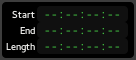
The current selection range, as set with the Range Mode tool, is displayed in these three clocks: start of the range, end of the range, and length.
Clicking on the range clocks will locate to either the beginning or end of the punch range.
Right clicking on any of the clocks brings up a context menu allowing to change the type of time display between the 4 clock modes, and to copy the selected clock's time to the clipboard.